How to turn off AI Overviews and AI Mode in Google
There's no setting, but the Web filter, udm=14 and -ai all removed it in our test.
AI Mode answers a Google search like a chat and links its sentences to sources. We asked it to compare the caffeine in espresso, black tea and an energy drink, and it came back with a table.
AI Mode is a separate tab in Google Search that answers like a chat. You type the whole question, Google runs a batch of searches for you, and you get one written answer with its sources listed on the right. Unlike AI Overviews, which show up on their own above some normal results, AI Mode only runs when you open it.
Google calls the technique query fan-out. AI Mode "divides your question into subtopics" and runs a search for each one at the same time, then combines what it finds. A question such as "best way to get from the airport to downtown Lisbon late at night with two suitcases" would be split into several searches (night transport, taxi prices, metro hours, luggage rules) that you would otherwise run one by one.
When the answer is on screen you can keep going: ask a follow-up, narrow it down or change one detail, and AI Mode keeps the context of the earlier questions.
We asked AI Mode to "compare caffeine in espresso vs black tea vs energy drink." The answer came back as a table rather than paragraphs: serving size, average caffeine per serving and caffeine per ounce for each drink, about 63 mg for a one-ounce espresso, 48 mg for eight ounces of black tea and 79 mg for an eight-ounce energy drink. A note under the table pointed out that energy drinks are often sold in 16-ounce cans, which doubles the dose.
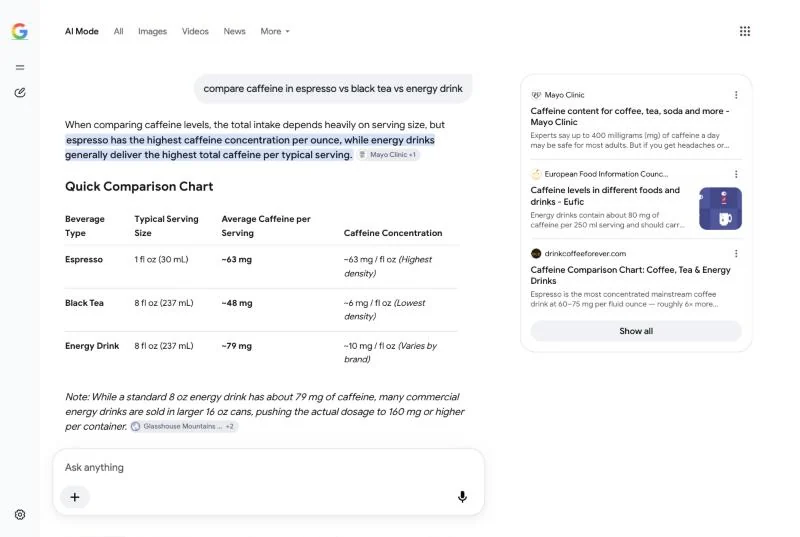
The sources panel listed Mayo Clinic, the European Food Information Council and a coffee site, and sentences in the answer carried small source chips linking to the pages behind them. Those chips were the most useful part of the page. Each one opens the page a sentence came from, and that's where we'd check a caffeine number before relying on it.
By default AI Mode uses a model Google labels "Auto" or "Fast" for everyday questions. Subscribers to Google AI Pro or Ultra can switch to Gemini 4 Argon from the menu in the "Ask anything" bar for harder, multi-step questions. Argon in AI Mode needs a personal Google Account and an age of 18 or over, has daily limits and is available in fewer countries than AI Mode itself.
| AI Overviews | AI Mode | Gemini app | |
|---|---|---|---|
| Where | Top of normal results | Its own tab in Search | gemini.google.com and the app |
| Shows up | Automatically, on some searches | Only when you open it | Only when you open it |
| Follow-ups | No, it hands off to AI Mode | Yes | Yes |
| Uses live search | Yes | Yes, many searches per question | When it needs to |
| Best for | A quick fact | Research questions with several parts | Writing, planning, longer tasks |
If AI Overviews get in your way more than they help, there's no setting to remove them, but there are reliable workarounds. We tested four in our guide to turning off AI Overviews and AI Mode.
AI Mode keeps a history of your conversations. On a computer, open AI Mode, click AI Mode history and delete single conversations from the More menu, or use Delete all at the top. They can also be deleted from your Search history. Turning off Web & App Activity stops future searches from being saved to your account, but it doesn't remove the history you already have.
Yes. AI Mode is free in Google Search. The option to switch to Gemini 4 Argon requires a Google AI Pro or Ultra subscription.
Google lists many countries and territories across the Americas, Asia-Pacific, Europe, the Middle East and Africa, and dozens of languages including English, Spanish, French, German, Japanese and Hindi.
No, the tab stays, but nothing runs until you click it. If you want AI Overviews gone too, our guide to turning off AI Overviews has the workarounds we tested.
No. AI Overviews are short summaries that appear on top of some normal results. AI Mode is a separate search mode that answers like a chat and takes follow-up questions.
Yes. AI Mode runs on Google's Gemini models. AI Pro and Ultra subscribers can choose Gemini 4 Argon for harder questions.